Saturday, January 30, 2016

Audiophile Revival, part 1

In this post, I touch some history and lessons learned in nearly 3 decades of audiophile system ownership and enhancement, as well as what new frontiers I am currently exploring in that space.

System History

In 1988, I became the fortunate owner of an audiophile-grade stereo system, thanks to my dad and Byron Yang of Sound of Peoria who set me up with a great selection of quality components which started me off right. Those components were:
  • Luxman R-115 receiver - transparent and powerful, bright recordings don't soften up through this amp
  • Dahlquist M-905 speakers - transparent and musical, can be light on bass
  • 10 gauge fine stranded OFC Monster cable, 8 feet x 2 - bare wires only on all terminals
  • Typical entry level Philips CD player - the SP/DIF out turned out to be important
  • Generic interconnects between disc player and amp

Let's just say the Luxman is well liked. That thing is built like a tank and its a total powerhouse, delivering very accurate and neutral amplification with loads of extra headroom and a high damping factor. It is very enjoyable to listen to. Although its specs read very conservatively at 70 watts per channel, the truth is this amp can deliver peaks of 270 watts per channel into 2 ohm loads without breaking a sweat.

The Dahlquists are also gems, which can tend be overlooked in the used market, but offer a compelling value for the prices they fetch. Frequency response goes up to 24kHz, and being 2 way speakers, there is less damage done to the sound by crossovers when compared to many 3 way speakers. The woofer is only 8 inches in diameter, but it is very agile, accurate and has a long throw. When coupled with the Luxman, there is an amazing amount of tight, musical bass to be enjoyed. Adding in a sub fills out that lower octave quite sufficiently.

Component Upgrades and Additions

Over the years I upgraded a few items:
  • Audio Alchemy Dac-In-The-Box outboard DA converter (around 2000)
  • Wireworld Atlantis III 1 meter interconnects (around 2001)
  • Improved disc players (various DVD and blueray players, all with SP/DIF out)
  • Denon DSW-30 powered subwoofer (Thanks Gregg)

I think most people would not drop $120 on a pair of 1 meter interconnect cables, but let me tell you, I was shocked that this one change made such an audible improvement in quality. The highs became noticeably smoother and the ambiance of the reproduced sound was enhanced. Even for casual listeners, this change was immediate and obvious. If you have a high quality signal chain that is truly transparent (as this one seems to be), you may be surprised at how much of a difference such a small item can make.

Similarly, the outboard DITB converter brought a marked improvement to the playback quality of the entire system. Bass was given more definition, and the upper mid-range and sibilance elements were given more delicate treatment. I think that unit maybe cost $150 or so - very worth the upgrade.

Malfunction Junction

Sadly, the Luxman amplifier section eventually succumbed to damage due to its age sometime around 2010. After doing a little research, it seems that most R-115s eventually develop the same problem: a mechanical relay for the output stage starts disengaging randomly. This happens in small bits at first, but soon the unit simply will not engage the relay at all and there is no signal provided to the speakers from then on. I just packed the unit away in storage and forgot about it for a few years.

Repair Rescue

Fast forward to 2015, as I worked my way cleaning through some items from storage and saw the Luxman, I was sad about not being able to enjoy it, so I started a search for someone to repair it. Thankfully, I found the perfect repair shop to take care of this: stereorehab.com. They were able to quickly perform a thorough repair and reconditioning job that brought the system back to life, possibly to a state that was even better than it was before. After just a few hours of listening, I was hooked again!

Starting Over, Again

Sometimes when I take a break from a pursuit and re-engage it after a lengthy hiatus, the fresh perspective brings some really good things to light. I have been catching up with what's been going on in this space, and there are some truly revolutionary changes under foot, especially regarding improvements to how digital audio is processed. The site computeraudiophile.com is a great source of information for those interested in the topic.

Latest Upgrades

I have recently added a new outboard DA converter that handles all manner of high resolution bitstream formats up to 384KB/sec DXD/PCM and DSD128 too. I have also been testing several different open source computer audiophile playback systems, running on everything from vanilla PCs to Raspberry Pi boards, with varying degrees of success. These will all be the topic of future posts, but suffice it to say that I have never heard sound that is anywhere close to this sweet coming from this system before. It still has me dropping my jaw that for years, I owned a system which was this capable, if only it were fed input from such clean sources! Many of these amazing recordings are freely obtained within the high resolution audio community as demo tracks. However, even my large collection meager CD/Redbook rips have been seriously upgraded through simple, on-the-fly upsampling. There really is a lot of good information in those files! As it turns out, some fine details about how the information is extracted back out is critical to the final listening quality.

More to come!

Performance Testing A Wireless LAN

I have Ubiquiti wireless network gear on my 2.4GHz home WLAN. Recently, I opted to add one of their new Ubitquiti UAP-AC-LITE access points to provide a faster network path to better support running of Time Machine backups from my Macbooks to a new NAS I built (a story for another post).

This access point provides several nice features, including a wired gigabit connection and power over Ethernet.

This unit also provides a nice RF scan function that runs for about 5 minutes. Upon completion, it depicts the status of your RF environment so you can make informed choices about how you configure it. Below are the results of that scan for the area near my office.


RF Environment scan results for 5GHz spectrum in my office area

Based on those RF results, I've configured this access point to use a quiet 5GHz channel that is 80MHz wide to optimize throughput.

Often when one does an upgrade like this, it can be easy to accept any indicator of improvement as proof that the expected benefit is there. But when I saw some differences in WLAN performance between my Macbook and my Nexus 6P, I wanted to confirm what I was seeing with a solid test that isolated the wireless links. I considered trying to use a typical Internet speed test, but then that is measuring much more than just the speed of the wireless link. Even doing a file transfer of a large file from the NAS does not truly isolate the wireless leg of the network. This led me to do a little research and in the end, iperf3 came to the rescue.

To do this test, just SSH into the access point in question and run the following iperf command:


iperf -f M -i 1 -p 11111 -s -t 60 -N


Then on the client device (in my case, the Nexus 6P) I feed it the following matching client oriented options:

-f M -i 1 -p 11111 -t 60 -N -c 192.168.1.x

   use the ip address of your access point here


For this, I was rewarded with the following output on both the client and the access point:


[  4] local 192.168.1.x port 11111 connected with 192.168.1.y port 46275
[ ID] Interval       Transfer     Bandwidth
[  4]  0.0- 1.0 sec  15.0 MBytes  15.0 MBytes/sec
[  4]  1.0- 2.0 sec  15.9 MBytes  15.9 MBytes/sec
[  4]  2.0- 3.0 sec  15.9 MBytes  15.9 MBytes/sec
[  4]  3.0- 4.0 sec  16.0 MBytes  16.0 MBytes/sec
[  4]  4.0- 5.0 sec  15.8 MBytes  15.8 MBytes/sec
[  4]  5.0- 6.0 sec  16.1 MBytes  16.1 MBytes/sec
[  4]  6.0- 7.0 sec  15.8 MBytes  15.8 MBytes/sec
[  4]  7.0- 8.0 sec  16.0 MBytes  16.0 MBytes/sec
[  4]  8.0- 9.0 sec  15.7 MBytes  15.7 MBytes/sec
[  4]  9.0-10.0 sec  16.1 MBytes  16.1 MBytes/sec
[  4] 10.0-11.0 sec  15.4 MBytes  15.4 MBytes/sec


This is a decent improvement, about 2x. And it makes sense when I confirm the connection speeds on each network. First, here is the 802.11n network on 2.4GHz as seen by Android:


Based on the 117 Mbps rate, I presume this is a 20 MHz channel configuration with 2 streams in use, backed down off the max rate of 130 Mbps by 10% to arrive at 117 Mbps. The 130 Mbps starting number is due to not using a "Short Guard interval" feature, that would otherwise set the maximum speed to 150 Mbps. The explanations given here and here were very useful to help understand how reduced connection rates work. Note: expect to enjoy a little less than half of the shown "air link bit rate" due to things like partially degraded signals, driver inefficiencies and IP protocol overhead. Also, in this specific case, that UAP's wired interface is limited to 100 Mbits, so there's no way a wireless client to take advantage of that extra 17 Mbps in the link speed shown above.

Then here is the what the 802.11ac network connection looks like to Android:


This link speed matches with the expected max speed for a two stream 802.11ac configuration set for 80 MHz width, as depicted by this chart:


But, for reasons I still don't fully understand, even at the 867 Mbps link speed, the transfer rate is far below what I would expect (15 MB/sec instead of a more idealized 45MB/sec or so). This performance is still plenty good enough for me. Its also close to what I'm seeing for transfer rates on my Macbook, which gets around 20MBytes/sec. In the case of the Mac, I do get a little more information about the link speed by doing an option-click on the wifi icon:


The 351 Mbps tx rate shown here is probably lower than 867 because the mac is on a different floor than the AC access point. It does help to explain the lower than expected 20MB/sec transfer rate on that box. However, the Nexus phone peaked at 15MB/sec transfer speeds while being just a few feet away from the access point. Previously, the max speeds between the Nexus 6P and the UAP access points running 802.11n on 2.4GHz topped out around 7MB/sec, so although the gain of roughly 2x isn't as good as I would have hoped for, it is a very welcome improvement.

I suppose I could eek out a little more throughput numerically had I explored the lower overhead, UDP-only options of iperf, but most of what will stream over the WLAN will be TCP anyway, so measuring for that additional overhead in the test is probably best.

Have you speed tested your wireless LAN? If so, how did you do it and what kind of performance are you seeing?


Tuesday, August 7, 2012

Detecting site performance anomalies using cURL

I recently participated in an IBM Webshpere Commerce Server deployment and was tasked with hunting down the source of some performance anomalies. cURL is a tool that has the ability to easily probe and collect detailed timing data using its many options. Below are the links I referenced to write my scripts that provided critical information and insight into the problem. I will add more detail here soon about what exact steps I used. 


http://newestindustry.org/2006/10/03/baseline-testing-with-curl-2/

http://josephscott.org/archives/2011/10/timing-details-with-curl/

http://www.jonefox.com/blog/2011/10/10/find-the-time-to-first-byte-using-curl/

http://curl.haxx.se/docs/manual.html

Front-end enginerring: Image compression


I recently participated in an IBM Webshpere Commerce Server deployment and was surprised when I ran Google's PageSpeed against the site, that it suggests the use of image optimizers on the stock widget graphics. The analysis for one of our pages was as follows:


The detailed message under the Learn more link was helpful in that it linked to the tools they suggest using - bookmarking it here for reference:


Use an image compressor.

Several tools are available that perform further, lossless compression on JPEG and PNG files, with no effect on image quality. For JPEG, we recommend jpegtran or jpegoptim (available on Linux only; run with the --strip-all option). For PNG, we recommend OptiPNG or PNGOUT.

Tip: When you run Page Speed against a page referencing JPEG and PNG files, it automatically compresses the files and saves the output to a configurable directory.

I would expect an off the shelf tool to do these kinds of optimizations on their own graphics before shipping, no? Some of the absolute numbers seem small, but every 1.5K is a packet that doesn't need to be sent, and this is a small step to make for such an easy gain.

Friday, September 30, 2011

RAMDisk options for Windows

IBM Rational Application Developer can be real hard on the disk, especially when debugging in the test environment for Websphere 6. In lieu of convincing my employer that every developer should get a speedy SSD or RAM-based disk to minimize wait times between WAS6 restarts, I have been investigating the available options and have been looking at software based RAMDisks. These could even be faster than most SSD disks, in theory.
I was pleasantly surprised to find these options below are available for Windows 7:
For now, I need to test these out and see if there really is a benefit for some of the IBM RAD slowness I see on a daily basis. I will post my findings here at a later date.

Saturday, September 24, 2011

Graywater Heat Reclaimation

Just some links/notes on a topic I became interested recently. Why do I find graywater heat reclaimation interesting?
  • cost saving: reduced energy bill
  • cost saving: extends the life of the water heater
  • cost avoidance: average water heater recovery times are markedly improved
  • environmental goodness
  • low/no risk: passive system with no moving parts
See

Seems like the price is around $750 for a bit of copper pipe that is supposed to last about 50 years.

Javascript: An easy to make day-of-week calculation bug


Friday, July 8, 2011

Windows batch script timestamps from gAWK

# This uses GNU Awk to emit a script to set an environment variable to the current date and time in a format suitable for use as a filename.
# See http://www.gnu.org/software/gawk/manual/
# You should supply two variables:
# 1) output_filename
# 2) env_var
BEGIN {
format = "%Y%m%d_%H%M%S"
print "set " env_var "=" strftime(format) > output_filename
}


Invoke with something like

gawk -v "output_filename=tsgenerated.bat" -v "env_var=TS" -f dt.awk
call tsgenerated.bat

Thursday, November 25, 2010

Saturday, November 20, 2010

Frontend Engineering

With all the talk about Google PageSpeed in the past several months, I have developed an appreciation for learning how to improve user's experiences through better management of the conversations between web browser and server. These concepts pertain to an area of discipline that is being called Frontend Engineering.

Given tools like PageSpeed, it is a shame that many sites still fail to address the issues it reports. Easy gains are often had by following the advice it offers.

I hope to document some of the issues I encounter as I work through them in my day job, involving a large application that I'll call Big Enterprise App (BEA). I'll aim to compile from this a series of Frontend Engineering entries.

Update: Here is a good description of the topics Frontend Engineering deals with. The most succinct description I've heard for this kind of work so far is "responsibility for View Source."

New Toilet - Toto Drake II

We recently bought a Toto Drake II CST454CEFG to replace a poorly installed (and poorly performing) "builder grade" Mansfield Alto 160. The Toto uses only 1.28 gallons per flush, but it never clogs like the Mansfield did. It also is an elongated style, ADA height and overall just seems to have a higher quality fit and finish.


We ended up purchasing online through National Builder Supply, where we got $20 off for using Google Checkout. Shipping was free and the packing was impressively solid with no damage at all to the parts at all.

Installation was pretty straightforward, once I learned that a good way of coping with a broken PVC flange included overlaying it with a metal one expressly made for that purpose.

Obsoleting our plunger was reason enough to make the switch, but we really like that this minimizes our water usage and saves on the bill.

Our take:
  • Environment +1
  • Reduced rate of consumption for water service and softener salt +1
  • Improved aesthetics +1
  • No more plunger needed +1
  • Price was right, at $306 after $20 discount
We expect to place one of these in our other 2 bathrooms in the coming months.

Friday, October 2, 2009

Running JDK6 on FreeNAS 0.7rc1 rev4735

I had a good experience a few months ago when I re-purposed an old and inexpensive Dell PE400SC server as a network attached storage device running FreeNAS. That system has been a joy to work with, and has served to introduce me to my first experiences with iSCSI mounts from my Windows 7 box.

The underpinnings of FreeNAS are FreeBSD:

freenas:~# uname -a
FreeBSD freenas 7.2-RELEASE-p1 FreeBSD 7.2-RELEASE-p1

...as uname explains. Fortunately, FreeBSD is a system that I've gotten to appreciate and know for several years now. So it was just a matter of time before I started looking for what else this machine could do for me. Sure a few small utilities like screen, autossh, and gawk are nice to have, but my bigger interest lies in java applications, so I really wanted a JDK to support that.

So here are the steps I had to navigate to get the Diablo JDK into FreeNAS. I must say, the FreeNAS documentation site seemed kind of hit and miss for some of this information.


Fetch the java binary


I found this was easier done from Firefox from my Win7 box and saved back to the NAS, in part, because the URL redirects to a POST-only form. Grab the file from:


http://www.freebsdfoundation.org/cgi-bin/download?download=diablo-jdk-freebsd7.i386.1.6.0.07.02.tbz


Make pkg_add happy


There seems to be some confusion about what version of FreeBSD this was built with. Try this:


setenv PACKAGESITE ftp://ftp.freebsd.org/pub/FreeBSD/ports/i386/packages-6.4-release/


Attempt Diablo install


Try to install the java binary, but beware it may balk.

pkg_add -v diablo-jdk-freebsd7.i386.1.6.0.07.02.tbz


If it does complain, you may need to do a series of individual fetches with pkg_add:

pkg_add -r x11/xtrans-1.0.4

etc., for every complaint. Then retry the diablo install. In the end, I was rewarded with this:

freenas:~# java -version

java version "1.6.0_07"
Diablo Java(TM) SE Runtime Environment (build 1.6.0_07-b02)
Diablo Java HotSpot(TM) Client VM (build 10.0-b23, mixed mode)


...and a working javac!

Tuesday, September 29, 2009

Jetty 6.1.x hardening

By day, I am a web developer using Java. At work I'm forced to used RAD 6.0, Websphere and JDK 1.4. But on my own time, I favor Jetty for its light weight and ease of use.

Every time I update Jetty, I eventually get around to repeating the same configurations. This entry documents what I've found to be useful towards setting up a production-ready instance of jetty that has limited risk exposure.


Remove sample webapps

Delete all files under webapps\** - also, enable jetty-plus web apps at the same time (all my apps tend to use jndi and connection pools)

Disable default favico

Change etc/jetty.xml to stop serving the default favicon - find DefaultHandler add this serveIcon false setting:

<New id="DefaultHandler" class="org.mortbay.jetty.handler.DefaultHandler">
<Set name="serveIcon">false</Set>
</New>


Conceal server name/version header

Put this under server elements in both jetty.xml and jetty-plus.xml:

<Configure id="Server" class="org.mortbay.jetty.Server">
<Set name="sendServerVersion">false
...


Configure a default/ROOT webapp

Inside this webapp, use Jetty's error code range mappings to do something like this:

<get name="errorHandler">
<call name="addErrorPage">
<arg type="int">300</arg>
<arg type="int">599</arg>
<arg type="String">/WEB-INF/ERROR/generic.jsp</arg>
</call>
</get>

Change the default session cookie name

Normally, J2EE containers send a JSESSIONID cookie in the first request. But why even expose the fact that you're running a servlet container in the first place? Customize this cookie's name using the following in web.xml:

<context-param>
<param-name>org.mortbay.jetty.servlet.SessionCookie</param-name>
<param-value>XSESSIONID</param-value>
</context-param>
<context-param>
<param-name>org.mortbay.jetty.servlet.SessionURL</param-name>
<param-value>none</param-value>
</context-param>

That second setting disables URL session cookies.

The remainder of these notes addresses configuration items that have nothing to do with hardening - these are just convenient reminders to myself.

Add datasources

Under the Configure element for org.mortbay.jetty.Server, add resource definitions as needed.

Here is one example of a datasource with a pool defined using Apache DBCP (put all jars in etc/lib/ext):

<New id="TESTDB" class="org.mortbay.jetty.plus.naming.Resource">
<Arg></Arg>
<Arg>jdbc/TESTDB</Arg>
<Arg>
<New class="org.apache.commons.dbcp.BasicDataSource">
<Set name="driverClassName">com.ibm.db2.jcc.DB2Driver</Set>
<Set name="url">jdbc:db2://example.com:50000/TESTDB</Set>
<Set name="username">user</Set>
<Set name="password">pass</Set>
</New>
</Arg>
</New>


Add MIME mappings for required content types

Add the MIME mappings you'll need to etc/webdefault.xml - a few I have used are:

<mime-mapping>
<extension>jad</extension>
<mime-type>text/vnd.sun.j2me.app-descriptor</mime-type>
</mime-mapping>

<mime-mapping>
<extension>cod</extension>
<mime-type>application/vnd.rim.cod</mime-type>
</mime-mapping>

<!-- also add maps for ogg, others, etc. -->


Replace the DefaultHandler with a custom class


The default handler automatically lists all contexts configured for the webapp, which is not something you typically want in a production environment.


What other customizations would you recommend for locking Jetty down at initial setup?

Friday, January 9, 2009

Using recursion with grep on windows

I've hit this problem before, but never figured it out, so it has bugged me for a while now. But finally, here is the answer.

Having recently started on support for a new project at work, I wanted to get a sense of who had worked on this code base over the past decade or so of its existence. Being a fan of GNU tools for Windows my mind immediately goes to grep, but it didn't work the way I intuitively thought that it should. I wanted to do this from my project directory:


   grep --recursive @author *.java


...and then I figured a quick awk script could roll up counts by name for me. That last argument of *.java however needs be either a list of non-wildcarded filenames or a simple *


  grep --recursive --include="*.java" @author *


Thanks to the poster of this message for helping me find the answer.

Saturday, November 22, 2008

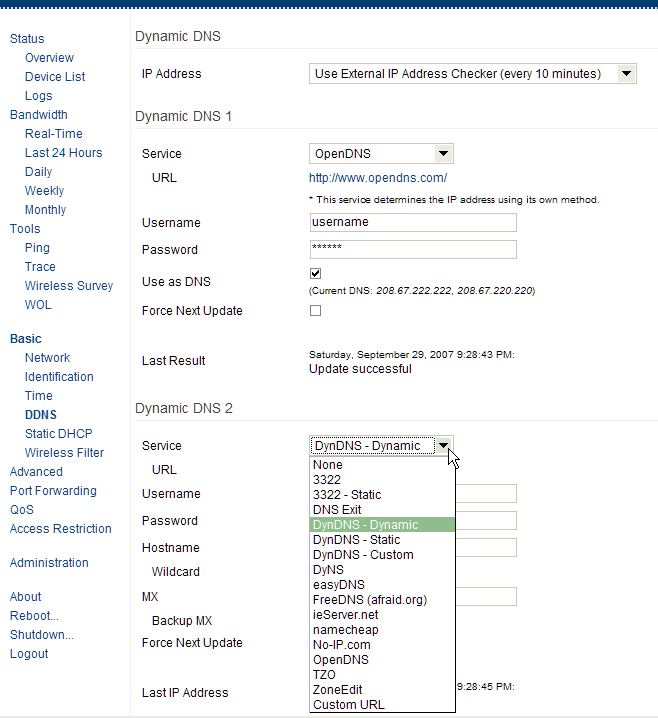
Internet filtering using Linksys routers, Tomato firmware, OpenDNS and FreeDNS

I recently had the opportunity to help out a friend who had some very specific requirements for a home LAN which they were in the process of connecting to the Internet via a cable modem. They wanted to have some restrictions and controls in place to block those nefarious and family-unfriendly web sites, as well as giving different degrees of access to different machines in the home based on things like time of day. After investigating several options for hardware and software, I was pretty happy with the results and thought I would share some of this information.

The Hardware


Linksys have made variations of their WRT54G line of internet routers since 2002. These amazing little devices have a wonderful reputation for their flexibility, stability and low cost. We're talking here about a $45-$65 consumer-level electronics item that is capable of running free software which bestows upon it many capabilities normally associated with systems costing at least 10 times the price. It is also nice to see that the specs on these quiet and power-sipping routers resemble those of circa 1998 PC (266Mhz, 16Mb Ram). Bonus points for being green!

Unfortunately, as with many things in life, Linksys decided to trim back their cost to build these little gems. So hardware revisions 5 and later of the mainstream WRT54G line do not have sufficient memory to support our main requirement: the loading of 3rd party firmware/software. The good news is that Linksys have gone on to provide enthusiasts with a router that does supply enough memory for this purpose, the WRT54GL. The current 1.1 revision of this router has a 200MHz CPU, 16Mb of ram and 4Mb of flash memory. I would, of course, like more memory (prior revisions of the 54G's had double that), but this is enough for most configurations that use alternative software. For those who are hardcore and want the very best, the well endowed 54G/GS models  can still be found out there on e-bay. Just be sure to check exact compatibility of your hardware version to the software you intend to run.

The Software


There are many choices for what software to run on these routers. Some of the more popular ones are DD-WRT, OpenWRT and Tomato. In this case, I chose Tomato for several reasons including:
  • a clean user interface: nicely done layout, vector-based graphs
  • many advanced options and functions are made accessible via the user interface
  • it has been stable and problem free for me for years. Current uptime as I write this: 120 days
  • its well maintained: I still get new releases every few months
By default, Tomato gives you not just one, but two configurable trigger actions that can be fired off whenever your service provider assigns you a different IP address. This came in very handy for the purposes of this specific installation, as you will see below.

The Services

The two services I set up to be notified when the IP address is changed are OpenDNS and FreeDNS. They each provide a different benefit.

FreeDNS provides a zero-cost dynamic DNS service. For those who may not recognize what that is, it lets you refer to your router by name (instead of by numeric IP address) from anywhere on the Internet. When leaving your home for vacation or work, you may be in the habit of making a note of the IP address of your router so it can be reached from the remote location. This is actually a bit of a gamble because what if the IP address is reassigned after you've left? Good luck finding your router now! FreeDNS will give you a fixed host name (something like myrouter.freedns.org) which automatically reflects the last IP address registered by your router. Updates are instant and the price is free, can't beat that. This is very convenient, and may save more than a few PostIT notes with out of date IP addresses scribbled on them. It also opens up possibility for hosting your own Internet services to the world from a server in your home. And if you happen to own your own domain, i.e. "mypersonaldomain.com" it is trivial to set up a CNAME record that then becomes a synonym to the assigned FreeDNS name (aka "myrouterathome.mypersonaldomain.com" is then a synonym for "myrouter.freedns.org"). This gives you another layer of flexibility, so that your selection of dynamic DNS providers can be changed in the future, but your personally assigned host name can remain constant. Think of it as a phone number you own, but that you forward to your actual number which can change at anytime for any reason.

OpenDNS on the other hand is a bit different. First, an analogy. When your cell phone company sells you service, it often includes some form of voice mail system. For most people, that default voice mail service is free and adequate. But what if you had the option to get a more feature rich voice mail system from a source other than your phone company (I actually do this using PhoneTag-highly recommended. Ask me for a referral code if you want to get a discount or to try them out)? Some people wouldn't bother with this since it would probably involve typing some codes into the phone and setting things up, but others might find that option very useful, whether it be for the enhanced features they would receive, or the flexibility it affords ("hey, now I could switch cell phone providers and still keep my same voice mail and its messages!"). This is called "unbundling" and it is not usually something that your incumbent service providers will promote or even tell you about, but often they are forced at some basic level to support it, usually due to regulatory demands.

DNS service is just like that voice mail service: it is a built in feature that every Internet service provider will include, but you have the liberty to use another provider if you want to, and often there is some other advantage to be gained in doing so. The primary function of DNS service is simply to translate a name like yahoo.com into a numeric address like 123.234.56.78. So you may ask what would be the point of having another company do this mundane thing for you? The answer is that OpenDNS manipulates the responses to these lookups in ways that reflect your personally selected preferences and add value.

One of these value-add features is their anti-phishing mechanism, which will send your users to a warning page instead of to the deceptive "phishing" forms posted by criminals seeking to collect your personal information. I am aware that some of the more recent web browsers also advertise that they include this kind of functionality, but as a matter of design, there are better ways to solve that problem. First, why should your PC (or "each of your PCs" if you have multiple) spend time and disk space tracking an ever changing list of phishing sites and vetting every page that you try to visit? I don't know about you, but my computers are already slow enough that I don't want to make them each do more work. If someone else like OpenDNS is offering to proactively do this for me instead, I'll gladly let them deal with that overhead. Offloading this task to them also benefits any web browsers or other Internet software running on your PC which do not yet have anti-phishing support built into them. When these programs look up the address for badguy.com, today they get no protection. But if that lookup is going through OpenDNS, they're automatically covered.

Another big plus for OpenDNS is categorical blocking of sites by content type. Call it parental controls or whatever you want, but many of us never want to see the seedy sides of the Internet. This service goes a very long way towards removing the likelihood of that happening. It also gives you an opportunity (in the OpenDNS account console they provide) to enter in a list of specific sites that you always want blocked. This is above and beyond the blocking they do based on your selection of broadly defined categories. Some of their broad categories include items like:
  • Adult Themes
  • Adware
  • Dating
  • File storage
  • Forums/Message boards
  • Gambling
  • Games
  • Hate/Discrimination
  • Lingerie/Bikini
  • Movies
  • Music
  • P2P/File sharing
  • Pornography
  • Proxy/Anonymizer
  • Sexuality
  • Tasteless
  • Television
  • Weapons
  • several others...
Getting the benefit out of this blocking feature is a bit more work, but its not complicated at all. You must sign up for a free account with OpenDNS, select your blocking categories and configure a method by which your network is identified to them (explanation below). You must also enter in any sites or URLs that you specifically want to have blocked, if that is desired. However, those screens are easy to use and follow. And since the administration of all this is centralized through the OpenDNS console, it is easy to maintain and monitor. Even attempts to access blocked sites and categories are logged and reported, so you can see a ticker that counts the number of times lil Johnny tried to visit www.bad-site-that-parents-said-not-to-visit.com!

The "configure a method by which your network is identified " step is where Tomato's second IP address updater comes into play. The router sees every IP address reassignment automatically, and so it can very efficiently inform OpenDNS of this change within seconds. I am aware that OpenDNS does provide a software "updater" for you that runs on your PC which sort of works, but for detailed reasons I won't go into here, let's just say that isn't really a great solution (depends on a running PC, updates lag after IP reassignment, wastes PC resources by running and polling blindly, etc. all of which leave you burdened with running MORE software on PCs and being un/under-protected for periods of time).

Future direction, final words

In my estimation, OpenDNS is the biggest news here. The nice thing is that you probably don't even have to run Tomato or have a special router to use it, although it is helpful if you do.

As nice as OpenDNS is (I may yet find that their controls alone are sufficient), I am still looking for a way to run a whitelisting proxy for certain PCs in the home. I know this is simple enough to do on a full PC running some form of unix and a proxy package like squid, but that seems like overkill. Ideally, I'd like a very simple, non-caching, whitelist proxy running ON the router and not on a separate PC. I'm looking into options like Privoxy, TinyProxy, Polipo and DansGuardian. Any success stories from router gurus out there would be appreciated.

I hope this is helpful to you if you've been looking for a good way to manage Internet connectivity in the home. There are always little ways that kids can find around measures we take, but this is a good general solution that works for a large set of the problems faced by concerned parents.

-mc

Wednesday, September 17, 2008

Capping MOBS 2008 with a Sony PCM-D50

Here are some of the MOBS 2008 recordings I captured. If you're interested in details about the recorder or the process for capturing, read on below. Note that these recording attempts, as well as redistribution using this hosting provider is considered experimental. In an upcoming post, I may discuss the content of the talks at MOBS 2008.

Recordings

Flac format is lossless, so the files are bigger. Flac files are posted here in addition to the mp3 files in order to provide samples that approach original quality.

Update: I noticed that the file hosting provider, Dropbox, is adding album art to these files as a form of advertising when you download them (I did not add the "RedMonk" album covers).

John Quinn "Stewards of Money and Material" 49:30
Background fan noise, low 2s rumble at 31:43 - i think a fly walked on the mics!
full mp3 -OR- 1 minute flac sample

Al Diestelkamp "Stewards of Body and Family" 41:38
At several points that fly buzzed by quite loudly. I've filtered some of that out. Good cap otherwise.
full mp3 -OR- 1 minute flac sample


Singing #1, 5 songs, 14:21
Unfortunately the big fan was very audible for all but the last 30 seconds of the 5th song.
full mp3


Singing #2, 5 songs, 14:41
Better this time. Calibrated levels after start of song #1 and turned the fan off right after that.
full mp3

"Sing On Ye Joyful Pilgrims" 3:53
A good sample.
full mp3 @160K -OR- full flac

"What Will It Be?" 1:51
A good example of the recorder driving to clipping, causing it to engage its digital limiter. Limiter was set to 150ms recovery.
full mp3 @192K -OR- full flac


Unfortunately due to operator error, the recording of 1 full hour of singing on Friday night was not successfully captured.
Also regrettably, I was unable to capture all of the talks that were given.


Sony PCM-D50 Recorder


I have played audio engineer for as long as I can remember. The recording equipment side of my studio was in need of something better than a laptop for a digital recorder, and so I've been keeping an eye out on the various offerings in that space as they are released. Last week, I finally bit the bullet and picked up a Sony PCM-D50 linear PCM recorder. This portable device records good quality audio to solid state memory. It supplies its own attached pair of mics, but can also receive input signal from line in or SP/DIF digital IO devices if the situation calls for it. If you are interested, these links tell way more about the hardware than I will cover: brochure official page review review sound samples

After just a few quick recording tests around my home, I gave this piece of gear its first test at MOBS 2008. The venue is challenging and not very audio friendly: the room has several loud fans which could all be turned on, a refrigerator that cycles and many open windows that invite in the sounds of nature as well as noise from occasional yard maintenance vehicles. Close miking was out of the question, since the speakers vary so often and they tend to move around during speeches. A Capella singing tends to be impromptu and levels can vary widely. I had no idea what this would turn out like - I just wanted to see what this device was capable of with little preparation and experience. My intent was to spend as little time as possible distracted with recording and instead be focused on the teaching being done. Unfortunately, my lack of sleep the night before pretty much botched my focus for the next day.

The recorder has threading for a standard camera tripod on its back. So for capturing the lectures, I just used a mini-telescoping camera tripod I had on hand. This seemed to work fine on the table in front of the speaker, about 4 feet from their mouth set on the lowest height possible. For the singings, I simply combined one of my microphone boom stands with an OnStage CM01 tripod adapter. This was a perfect combination, allowing me to place the Sony at a height of 9 or 10 feet. Using the ball joint of the CM01 adapter, I could aim the Sony's mics back down at the audience to capture the group without any hot spots.

This recorder has an elaborate digital limiter. Fortunately, it was exercised and demonstrated well by these recordings. You can hear the limiter at work on the singing track "What Will It Be?" It works like this: a simultaneous recording of a second mirror track is made at a lower level (-20 db below your setting, I believe). This mirror track is stored briefly as the recorder checks to make sure there's no clipping going on. If a signal peak causing overload is detected, the -20db backup audio is normalized (brought to 0 db) and is "stitched into place of" the clipped signal. This feature alone compensates for one of the most difficult problems relating to digital recording and its a huge selling point. It's one of those features that once you've had it, you'll never want to go without it.

Recordings were all made at 44.1kHz 24bit. That 24bit part was fortunate, since the captured levels were often lower than intended (only about 15% of 0db). Converting those low levels into 16bit for redistribution here definitely was a breeze - that 24bit original provided more than enough bits of sample resolution to compensate for the low levels without dropping bit-precision in the final file (15% of 0db on 24bits is still far more than 0db on 16bit samples).

Some virtues the Sony has that swayed me in its direction:
  • amazing battery life. Over 24 hours straight on 4 AAs
  • top notch lossless recording quality ranging between 22kHz/16bit and 96kHz/24bit
  • very solidly built
  • digital input and output
  • a unique and highly practical digital limiter
and there are as always, a few drawbacks:
  • wind and handling noise
  • no mono recording (yet)
  • no facility for copying files from internal memory to a removable card is provided within the device itself (yet)
I say "yet" in the cons section because the device is firmware updatable and the hope is that Sony will add these features in an upcoming release.

Since the wind noise issue is so prominent, I was fortunate that B&H threw in the official Sony (and normally expensive, $50!) "dead cat" style windscreen for free. I was pleasantly surprised to find the windscreen package also included a soft carry bag for the recorder. I certainly didn't expect I would need to actually use the windscreen to avoid capturing any thunderous sounds from flybys by small insects!

I think that this will be a nice tool to have on hand for recording singing at lectures or at places like RJ Stevens' singing school.

Do you have experience trying to cap good quality audio in venues like this? What have you found that has worked for you?
So MOBS 2008 is over, and I am now mostly recovered from the experience and the weekend in Chicago I spent immediately afterward. I was glad to be there, but felt challenged about my participation. I have been having trouble sleeping lately and the shared quarters and constant rain (among other things, ... a big "shout out" to my neighbors at Motel 6 here!) made rest rather elusive. Operating on less than 2 hours of sleep is not great preparation for a Saturday full of bible study, but there was good in it nonetheless.

I appreciated Steve's talk entitled "Stewards of Time, Ability, and Opportunity" which very directly challenged us men on dozens of characteristics of the spirit, many of which we are still no doubt busy working on in our lives. I appreciated the singing together and the camaraderie with the men there. Several good discussions were enjoyed by this camper on Friday night. I only wish I had been more rested and that we had more time to enjoy the weekend together. The rain made it a little uncomfortable, even indoors due to the very high humidity.

I have another post I'll put up very soon that will talk about the recordings I attempted to make at MOBS using my new PCM recorder. I intend to post some of these tracks for download, a few of which include decent captures of the singing sessions.